
Key concepts
Understand the definition, the execution, and the evidence before building a larger automation.
One demonstrated task produces several related objects. Understanding the difference helps you change the right thing: edit a workflow to affect future work, inspect a run to understand one result, and open its session to see what happened in the browser.
Follow the guide-review example
The example task opens a documentation guide and returns its URL, title, and first three headings. Its workflow describes how to do that. The input Guide name changes between requests. A run is one attempt using a particular guide name.
A workflow can have many versions and many runs. Changing today's instructions does not rewrite yesterday's recorded result. Run with the same data creates another execution from a past run's input values; it does not resume or undo that past run.
Understand the blocks in the graph
An agent task block describes an outcome and the instructions to reach it. The runtime agent chooses browser or computer actions while executing. It is more than a fixed list of click coordinates: it can inspect the current page and ask for help when the expected choice is missing.
An input node collects declared values. A parser transforms supplied text or documents into named structured fields. In the example, the operator supplies guide_name, and the parser resolves requestedGuideTitle for the browser task.
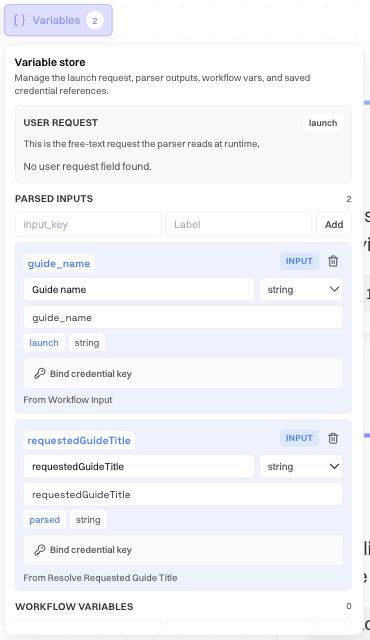
A variable carries a named value between steps. A branch selects a path based on a decision. A trigger describes when new work starts, such as a matching email or schedule; it is not an ordinary browser action in the procedure.
When troubleshooting, inspect the value at the stage where it became wrong. If the parser resolved the wrong guide title, repeatedly adjusting the later click instruction will not fix the input interpretation.
Know what Save changes
Draft normally means that authoring has not produced a compiled graph. A save carrying a valid graph makes the workflow saved and runnable, unless it is explicitly kept as a draft or incomplete trigger configuration blocks promotion.
Enabled means new launches are accepted. Disabled preserves the definition and history while pausing new launches. Disabling does not stop a run that is already active.
Editor changes autosave as versions. Editing an enabled workflow does not create an unpublished copy: subsequent launches can use the saved change. Disable first if automated launches must pause during a revision. Browser/computer workflows have no separate Publish step; Agents is a separate builder with a draft/publish lifecycle.
Distinguish procedure from evidence
The SOP is an editable written view of the graph. Its instructions map to the workflow's fields, so editing them changes the definition. The attached screenshots are evidence of recorded states; they help a reader recognize the page and target.
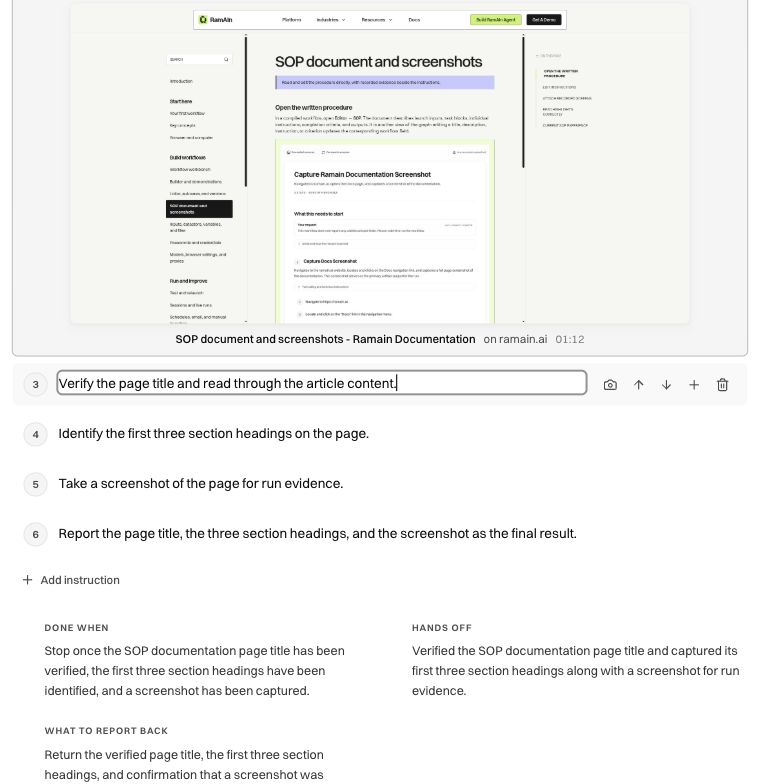
A screenshot from authoring is not a live view of today's run. After a large instruction change, review the attachment or re-match evidence so the procedure does not show an obsolete target. SOP document and screenshots explains attachment, editing, and stale evidence.
Decide where data belongs
Use Data and files for concrete examples. Then follow the quickstart to see a demonstration become a saved workflow and a verified run.
Was this page helpful?