
API contracts and troubleshooting
Use the generated schema for exact workflow inputs and environment-specific features.
Core endpoints
Paths below are relative to the environment API base.
The automations route here launches a saved workflow. Do not infer that an arbitrary Agent graph or a browser session ID can be substituted for workflowId.
The public v1 API does not currently expose a run-cancellation endpoint. Use the portal controls available to your role to manage a run. Browser interrupt requests an operator handoff, and deleting a browser-access grant revokes that grant; neither operation cancels the workflow.
Launch body
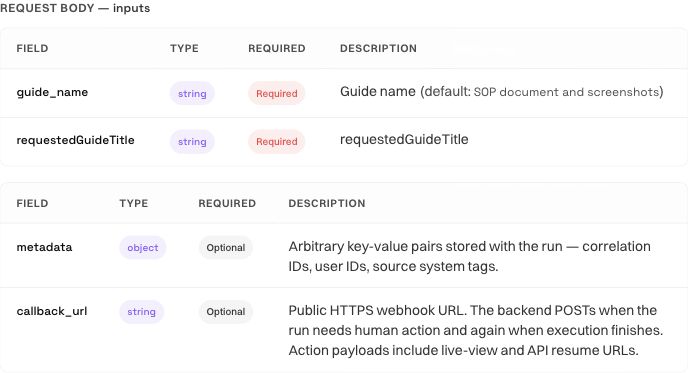
inputs is an object matching the selected workflow's declared input schema. Required fields, types, parser-backed inputs, and file handling depend on that workflow. Download or inspect the generated OpenAPI definition from its in-app API Docs page before generating a client.
Supplied input values must use the declared JSON type. Sending a number for a text field or a string for a number field does not request automatic conversion:
A type mismatch returns 400 INVALID_INPUTS with per-field INVALID_TYPE details. Missing required values and undeclared keys use REQUIRED and UNKNOWN_INPUT details. Saved defaults and the workflow's normal missing-input rules still apply; the type checks describe values explicitly supplied to the API.
Optional supported fields include callback_url for a public HTTPS notification receiver and metadata for your own correlation data. When supplied, metadata must be a JSON object. null, arrays, strings, numbers, and booleans return 400 INVALID_METADATA.
For example, send "metadata": { "request_id": "invoice-1042", "source": "billing" }. That caller object is returned as metadata in the launch/status run envelope, the result response, and the callback's run object. If omitted, it is {}. Internal runtime metadata is not included. Metadata does not override runtime configuration or supply workflow inputs; keep credentials out of data that is echoed to readers and callbacks.
Use the model field only when the selected environment's generated schema exposes it. Supported public tiers are pro, flash, lite, and max; a run override does not change the saved workflow. Do not send provider secrets or arbitrary vendor model IDs.
Browser and proxy configuration comes from the saved workflow or workspace defaults. Per-run browser/proxy overrides are rejected; configure those settings in the workbench.
Supply a file input
Use the selected workflow's generated file-input schema. A text-only guide-review workflow does not accept a file just because the request includes attachment bytes. First declare the file input in the workflow and verify how its task consumes it.
For a workflow with a single file field named source_file, the attachment pattern is:
{
  "inputs": {
    "source_file": { "attachment_id": "source-001" }
  },
  "input_context": {
    "attachments": [
      {
        "id": "source-001",
        "filename": "example.txt",
        "mimeType": "text/plain",
        "base64": "SGVsbG8K"
      }
    ]
  }
}
This illustrative payload contains the six bytes of Hello followed by a newline. Replace the input key, filename, MIME type, and base64 content with those appropriate to your workflow. The attachment_id must match the attachment's id; a filename or local path by itself does not supply the bytes.
Two limits apply to an authenticated workflow launch:
Base64 adds roughly one third to the file size: a 25 MiB file needs about 33.34 MiB of base64 before JSON overhead. Several files can each satisfy the per-file limit while exceeding the combined request-body limit. Measure the complete serialized request and reduce or split the work when it exceeds that ceiling. Other API routes may have smaller body limits.
Multi-file fields use the shape declared by their schema, such as an array of attachment references. Keep attachment identifiers distinct within the request. A missing attachment match or invalid base64 returns 400 INVALID_ATTACHMENTS; inspect the error before retrying the same request.
When the task produces a file, retrieve the terminal result and use the returned download reference. Verify the filename, expected format, and contents. A completed task returning text that mentions a file is not a substitute for an actual file output.
Run envelope and terminal states
The core run envelope includes run_id, workflow_id, status, timestamps, error, status_url, result_url, events_url, recording_url, and caller-supplied metadata. The returned API links use HTTPS. Fields may be null until their underlying resource exists. The envelope also includes the selected model, session_id, and live_view_url; session and live-view fields can be null while a launch is still queued.
Result polling must handle terminal failure states as well as completion, including failed, error, cancelled, terminated, dead_letter, and human_wait_expired. Read the returned result; do not treat HTTP success as business success.
Outputs depend on the graph. Use returned file/download references when present rather than constructing storage URLs or assuming every output is a file.
Download a session video
For a run with an available browser session recording, use its recording_url or GET /runs/{runId}/recording. The endpoint requires a backend API key with runs:read for the run's workspace. It returns an MP4 attachment; a portal sign-in cookie or a signed playback link is not needed.
curl --fail-with-body \
  --header "Authorization: Bearer $RAMAIN_API_KEY" \
  --output "${RAMAIN_RUN_ID}.mp4" \
  "https://api.ramain.ai/api/v1/runs/$RAMAIN_RUN_ID/recording"
recording_url is null until a browser session exists. A recording that is still being assembled returns 202 RECORDING_PROCESSING with Retry-After: 3; retry the same URL. A run without an available recording, including a computer session, returns 404 RECORDING_NOT_FOUND.
Downloads are limited to 128 MiB per video and 10 attempts per workspace per hour. Files over the size limit return 413 RECORDING_TOO_LARGE; excess requests return 429 RECORDING_RATE_LIMITED with Retry-After. Use an ordinary GET: byte-range requests are not supported. Save the result on your backend and keep your API key out of browser code.
Human intervention and live views
A run may wait for a person. The portal's live run is the operational place to inspect and answer its current prompt. A portal live-view URL requires an authorized signed-in user; an API key is not a portal session.
Intervention and retry controls
Use these controls to handle retries and waiting runs without creating duplicate work. Keep the key, workflow, checkpoint, and run in the same environment. Use https://api.ramain.ai/api/v1 and the generated schema for the workflow you call.
Avoid duplicate launches
Send an Idempotency-Key header or an idempotency_key JSON field (maximum 200 characters) when creating a run. The JSON field takes precedence when both are supplied. The key is scoped to your client and workflow: repeating the same request returns 202 with the same run; changing the request under the same key returns 409 IDEMPOTENCY_CONFLICT. Retain the original key when retrying a lost response.
For already-permitted application origins, the API permits the Idempotency-Key header in CORS preflights. This does not authorize additional origins. This does not make a workspace key suitable for frontend storage: launch from your backend, and use short-lived browser grants for SDK and iframe access in your dashboard.
Answer a checkpoint
When status is waiting_for_human_live, inspect human_action. It can include checkpoint_id, kind, reason, stuck, response_accepted, instructions, stop_condition, live_url, live_view_url, expires_at, and resume_url. Read the instructions and use the current checkpoint ID when answering.
# Use the identifiers returned by your workflow's run response.
export RAMAIN_API_BASE='https://api.ramain.ai/api/v1'

curl --fail-with-body --request POST \
  "$RAMAIN_API_BASE/runs/$RAMAIN_RUN_ID/human-input" \
  --header "Authorization: Bearer $RAMAIN_API_KEY" \
  --header 'Content-Type: application/json' \
  --data '{"checkpoint_id":"CHECKPOINT_ID_FROM_HUMAN_ACTION","response":"approved"}'
This write requires workflows:run. The response is 202 with the public run envelope. The run may still be waiting with human_action.response_accepted: true until its runtime owner acknowledges the answer. Continue polling instead of submitting a different answer to force progress.
An identical answer to the same checkpoint is idempotent. A changed answer or stale checkpoint returns 409 HUMAN_WAIT_CONFLICT; the wrong run state returns 409 NOT_WAITING_FOR_HUMAN; an expired wait returns 410 HUMAN_WAIT_EXPIRED. A run outside your workspace returns 404. Always send checkpoint_id even though it is optional for compatibility.
Receive notifications and retrieve files
The callback envelope has event_id, type, and run. A waiting checkpoint uses workflow.run.requires_action. A terminal callback uses workflow.run.completed and also includes result; the name covers terminal failures as well as successful completion.
Deduplicate by event_id, inspect the run status, and keep polling as a fallback. Delivery is best-effort with three bounded attempts for network errors, HTTP 429, or 5xx, with a 10-second timeout per attempt.
A callback confirms a notification event, not that your downstream service finished processing the result. Store the event ID before applying a non-repeatable downstream action. If delivery is unavailable, keep polling the original run. Use returned download references and the workflow's generated file-input schema; do not construct storage URLs or reuse identifiers across environments.
Handle errors
API errors use a JSON body with error and code, with extra fields where applicable. Use the HTTP status and machine-readable code to choose your response:
Do not assume that a cancelled terminal status implies a public cancellation endpoint. The current endpoint table defines the supported API operations.
For support, retain the run ID, request time, endpoint, HTTP status, and a redacted error. Never include the API key.
Embed a live browser or use the SDK
The new Browser SDK and embedded viewer guide explains short-lived grants, exact origins, iframe setup, permitted methods, acknowledged interruptions, and human checkpoint responses. Use the gateway in the same environment as the run. The guide distinguishes short-lived embedded access from portal live-view links that require workspace sign-in.
Was this page helpful?